
Adding a User to a Project
Project > Users
Add an existing Buildend user to a project so they can access project information and begin collaborating with the project team.
Table of Contents
Overview
Adding a user to a project gives them visibility into the project and assigns the appropriate Project Permissions based on their role. Once added, users can access project information according to their assigned permissions.
📝 Note
Before adding a user to a project, they must first be created in your Buildend workspace and have Login Access enabled. If the user hasn't been created yet, complete Creating a User first.
Step-by-Step Guide
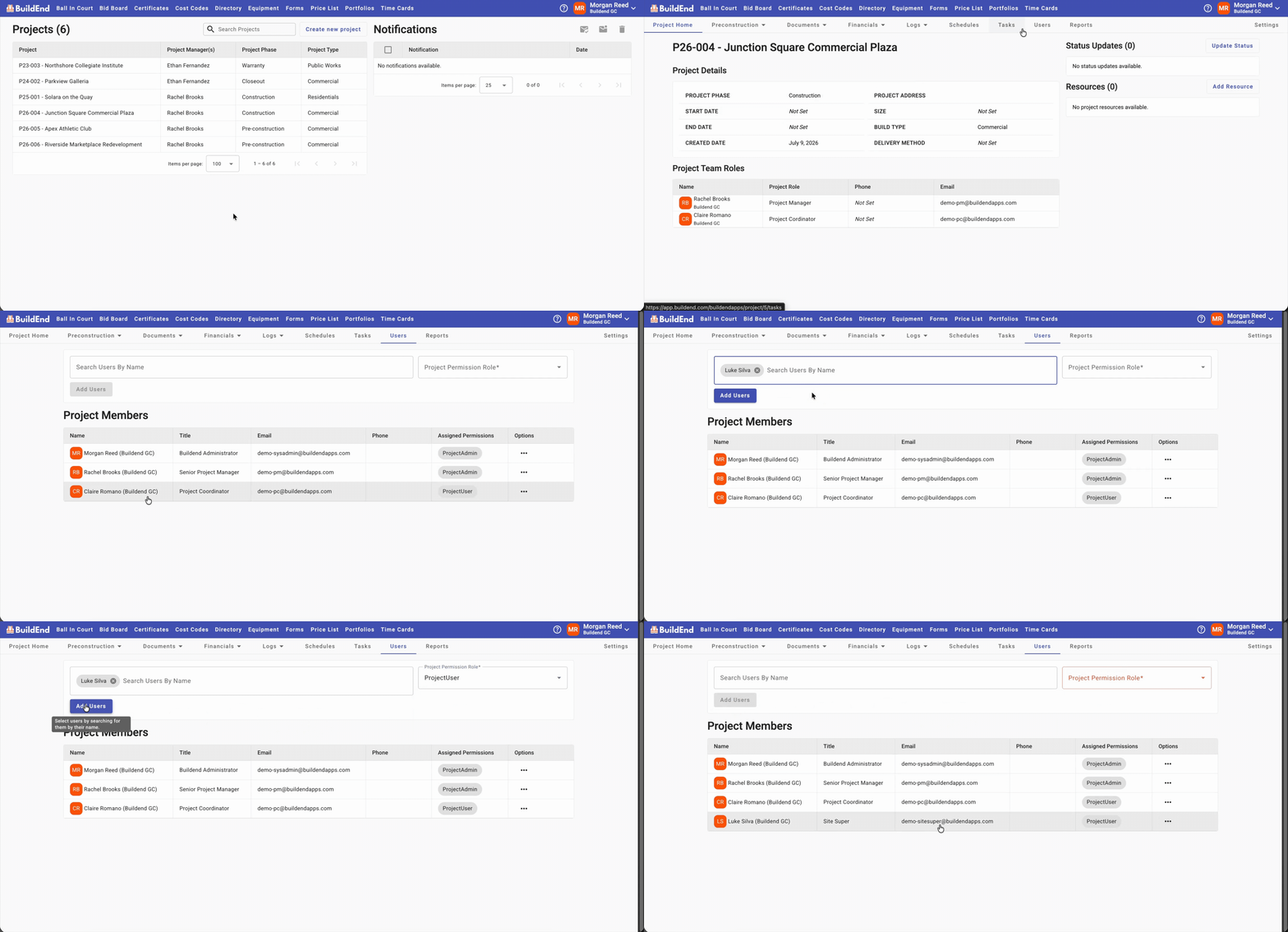
- Open the project you want to manage.
- Go to the Users tab.
- Select the user you want to add.
- Assign the Project Permission Role that best reflects the user's responsibilities.
- Click Add User.
The user is now a member of the project and can access project information according to their assigned permissions.
Action Clip
📝 Note
Next Step: If the user will participate in project workflows, assign a Project Team Role. This allows Buildend to automatically route workflow assignments based on the user's responsibilities.
Learn more: Assigning a Project Team Role
Still Need Help?
Not to worry! If you’re having trouble completing these steps or something isn’t working as expected, reach out to our support team at support@buildend.com ✌️